
To opt for the Composition Levy on the GST Portal as an existing taxpayer, perform following steps:
1. Access the https://www.gst.gov.in/ URL. The GST Home page is displayed. Login to the GST Portal by entering your login credentials.
2. Select ‘Application to Opt for composition Levy’ from the Registration Menu.
3. Application to Opt for Composition Levy page is displayed.

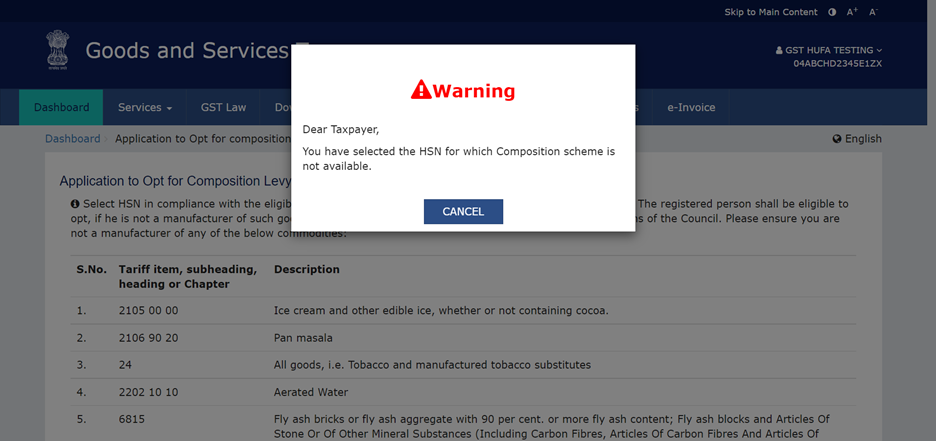
Note: If a normal taxpayer had entered HSN of any Goods or Service which is not eligible for Composition Levy while registering for GST and now wants to opt for the composition scheme, below warning message will pop-up. He/She will not be able to proceed further unless the commodity has been removed from the list of commodities.
4. Your GSTIN, Legal Name of Business, Trade Name (if any), Address of Principal Place of Business and Jurisdiction are auto-populated. Select the Category of Registered Person.
Note: Manufacturers who are dealing in Goods restricted for composition are not allowed to select option “Manufacturers, other than manufacturers of such goods as may be notified by the Government for which option is not available”. In case taxpayer selects the said option, then following error message will be displayed on the screen.

5. Select the Composition and Verification Declaration.
6. Select the Authorized Signatory from the drop-down list and enter the Place from where the form is filled.
7. Once all the mandatory fields are filled, click on the SAVE button.

Note: Taxpayer will not be allowed to opt for Composition Levy in CMP-02 if taxpayer's previous financial year Annual Aggregate Turnover (AATO) of all registrations taken on a PAN exceeds the threshold limit.
Therefore, on clicking the SAVE button following popup message will be displayed on the screen, if AATO exceeds the threshold limit.
For example, if existing regular taxpayer is opting for composition for FY 2025-26 in FY 2024-25 through CMP-02, then the AATO for FY 2024-25 will be considered.

8. A confirmation message is displayed that Application has been saved.

9. Click the SUBMIT WITH DSC or SUBMIT WITH EVC button.

Note: Taxpayer will not be allowed to opt for Composition Levy in CMP- 02 if taxpayer's previous financial year Annual Aggregate Turnover (AATO) of all registrations taken on a PAN exceeds the threshold limit. Therefore, on clicking of SUBMIT WITH DSC or SUBMIT WITH EVC button following popup message will be displayed on the screen, if AATO exceeds the threshold limit.
For example, if existing regular taxpayer is opting for composition for FY 2025-26 in FY 2024-25 through CMP-02, then the AATO for FY 2024-25 will be considered.
10.1. SUBMIT WITH DSC:
a. Click YES.
b. Select the certificate and click the SIGN button.

10.2. SUBMIT WITH EVC:
a. Enter the OTP sent on email and mobile number of the Authorized Signatory registered at the GST Portal and click the VALIDATE OTP button.

11. The success message is displayed. You will receive the acknowledgement in next 15 minutes on your registered e-mail address and mobile phone number.
